
Guides
How to schedule a Shopify section for Black Friday
ePlugin ·
Create your campaign content in a Shopify theme section, enable Visi Widgets, select the section in the Theme Editor and save a date/time schedule. Test the start/end behavior and store timezone before the campaign.
The merchant problem
Sections are reusable pieces of a Shopify theme; blocks are smaller elements inside sections. Manual launch and removal depend on operator availability. A schedule lets you prepare a banner in advance while keeping your native theme workflow.
How to do it with Visi
- Install Visi from Shopify App Store and enable Visi Widgets in the theme you intend to use.
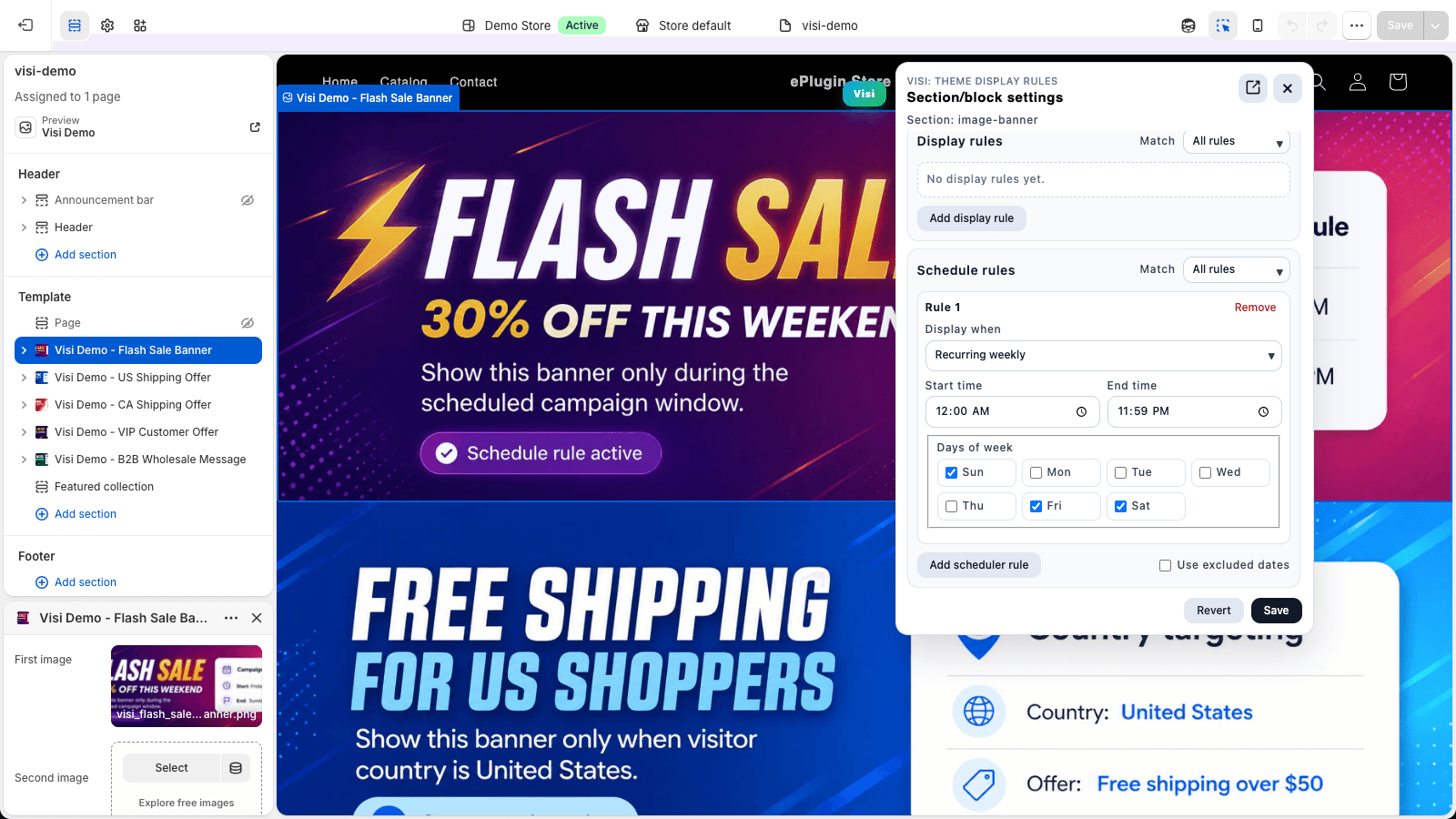
- Prepare the campaign section, then select it in Theme Editor and open Visi’s rules panel.
- Add a one-time schedule with the actual start and end. Confirm the store timezone and save the rule.
- If needed, add customer or market rules. Check whether multiple rules use all or any matching.
- Preview matching and nonmatching states. Publish the intended theme separately and verify the live storefront with the embed enabled.
Specific storefront use cases
Black Friday banner scheduling checklist
Confirm the actual sale window, prepare the theme content, enable the embed in the live theme, check the store timezone, and preview both matching and nonmatching states. Recheck other schedules on the section before relying on automatic end behavior.
Questions merchants ask
Can I schedule Black Friday content without manually publishing another theme?
For content already in your live theme, Visi can schedule its visibility.
Example setup
A single Black Friday banner can appear only during the configured campaign window. After the end, it is hidden while its rules remain enabled. It stays in the theme for later editing. Another passing schedule can keep it visible if schedules match any.
Further reading: Official Shopify documentation
Related resources
Use cases
Schedule Shopify sections for seasonal campaigns and flash sales
Schedule Shopify banners and sections for seasonal campaigns, Black Friday, flash sales and recurring promotions. Explore seasonal banners, sale announcements and automated campaign windows.
- Seasonal campaigns: Christmas, holiday and back-to-school sections
- Black Friday and Cyber Monday storefront content
- Flash sales and limited-time promotional banners
- Automatically show and hide scheduled Shopify sections
- Weekend offers, daily promotions and business-hour content
Guides
How to hide or show a Shopify section without rebuilding your page
Hide or show Shopify theme sections and blocks using theme controls, Liquid or display rules. Compare page, customer and time-based conditions.
Read the practical guide →